Engagements (X)
In Engagements, you can check the performance of user reactions. You can analyze high-Engagements Posts and use the insights for future Account management.
In each graph and table, data is displayed on the day they were Posted from your X (Twitter) Account. For example, if a Reply to a Post from July 1 occurs on July 2, it will be displayed as a Reply for July 1.
Displayable Analytics Items
- Engagements Summary
- Engagements
- List of high-Engagements Posts
Engagements Summary
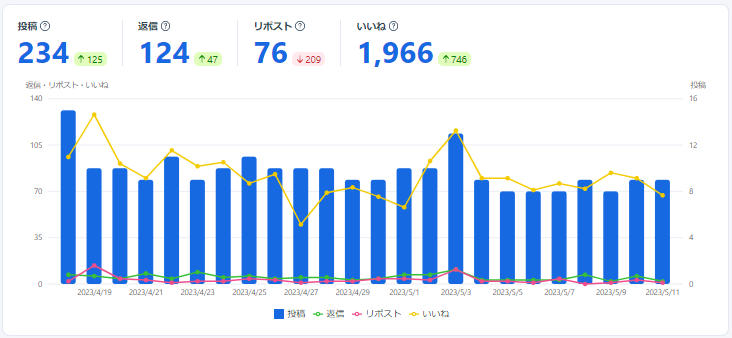
In the Engagements Summary, you can check the total count for each type: "number of your Posts", "number of Replies to your Posts", "number of Reposts (Retweets) to your Posts", and "number of Likes to your Posts", as well as the count for each period segment in a graph.
Engagements
In Engagements, you can check the count for "number of your Posts", "number of Replies to your Posts", "number of Reposts (Retweets) to your Posts", and "number of Likes to your Posts" for each period segment in a table format.

List of high-Engagements Posts
In the List of high-Engagements Posts, you can check the "number of Replies", "number of Reposts (Retweets)", "number of Likes", "Engagements", and "Impressions" for Posts within the period in a table format. By default, they are sorted by Engagements, Highest first. You can also search for specific Posts.
