Time of day (X)
In Time of day, you can view your post data by time of day. You can use this to identify times of day with high engagements and create posts with higher engagements.
Time of day refers to the time when a post was published.
Available Analytics Items
- Most Reposted Post Time of Day
- Most Liked Post Time of Day
- Most Posts by Time of Day
- Posts by Time of Day
- Engagements by Time of Day
- Average Engagements by Time of Day
- Posts and Engagements by Time of Day
Most Reposted Post Time of Day
"Most Reposted Post Time of Day" allows you to see the time of day when your posts received the most Reposts (retweets).

Most Liked Post Time of Day
"Most Liked Post Time of Day" allows you to see the time of day when your posts received the most Likes.

Most Posts by Time of Day
"Most Posts by Time of Day" allows you to see the time of day when you published the most posts.

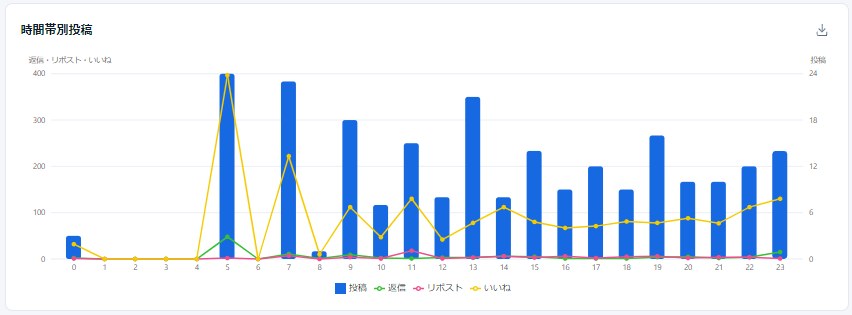
Posts by Time of Day
"Posts by Time of Day" allows you to view a graph showing the number of your posts, the number of Replies to your posts, the number of Reposts (retweets) to your posts, and the number of Likes to your posts, all by time of day.
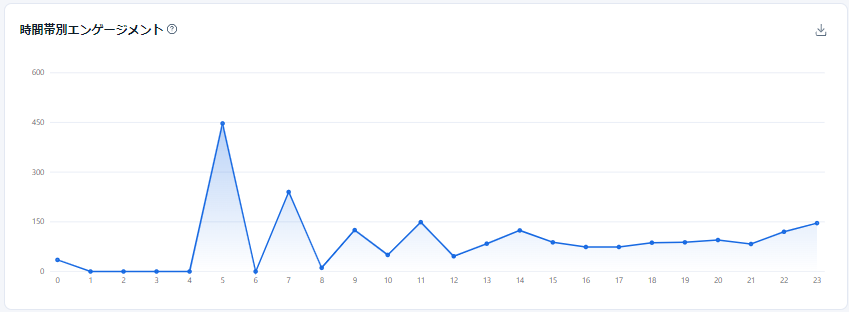
Engagements by Time of Day
"Engagements by Time of Day" allows you to view a graph showing the engagements on your posts by time of day.
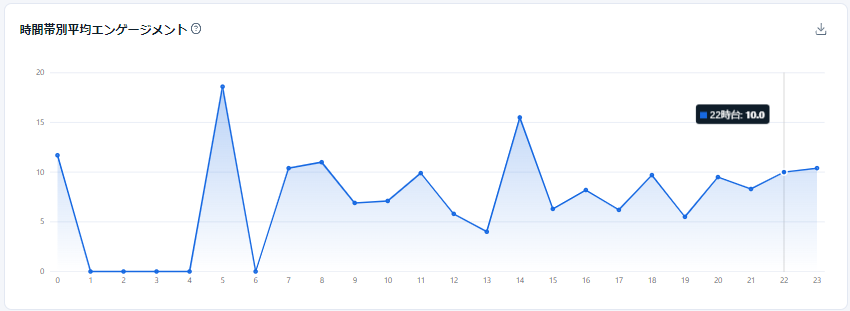
Average Engagements by Time of Day
"Average Engagements by Time of Day" allows you to view a graph showing the average engagements on your posts by time of day.
Posts and Engagements by Time of Day
"Posts and Engagements by Time of Day" allows you to view a table showing the number of your posts, the number of Replies to your posts, the number of Reposts (retweets) to your posts, the number of Likes to your posts, Engagements, and Average Engagements, all by time of day.
