Follower management is now available even on the Free plan.

Thank you for always using SocialDog.

We are pleased to announce that follower management features are now available for Free Plan users.

This allows you to check your follow/follower status and perform "follow" and "unfollow" actions directly from SocialDog.

Key Enhancements

  • You will now be able to acquire follow/follower information.
  • Follower-related metrics will be viewable in the graph at the top of the dashboard.
  • You can now view categorized lists of follows/followers in the "Followers" section.
  • Quick filters and sorting options are now available in the "Followers" section.
  • You can now perform "follow" and "unfollow" actions directly within the SocialDog interface.

Detailed Changes

  • Ability to Acquire and Display Follow/Follower Information
    • Before Change
      • Not available for acquisition or display.
    • After Change
      • Follow/follower information will be acquired and displayed in categorized lists within the "Followers" section, including the following categories:
        • Not Following
        • Not Followed Back
        • Inactive
        • Mutual Followers
        • Following
        • Followers
        • New Followers
        • New Unfollows
      • The dashboard graph will display "Following", "Followers", "Net Followers Gained", and "Net Following Gained".
      • Data updates are processed sequentially, prioritizing paid plan users. Therefore, it may take some time for changes to reflect for Free Plan users.
  • Quick Filters and Sorting Now Available
    • Before Change
      • Not available.
    • After Change
      • Quick filters and sorting (Newest first, Oldest first) are now available.
        • Filter settings cannot be saved.
  • Ability to Follow/Unfollow Directly on the SocialDog Screen
    • Before Change
      • Not available.
    • After Change
      • From the "Followers" section, you can follow/unfollow within the following daily limits:
        • Follow: Up to 25 times/day
        • Unfollow: Up to 100 times/day

Please feel free to contact us via the support form if you have any questions.

SocialDog will continue to strive daily to develop services that satisfy all users. We appreciate your continued support.

The posting feature is now more convenient to use for Free and Personal Plans.

Thank you for always using SocialDog.

We have reviewed the features available in the Free and Personal plans, making scheduled posts even more user-friendly.

Main Changes

  • Easier scheduling of posts across multiple social media accounts.
  • Unlimited addition of drafts.
  • Unlimited addition of scheduled queue settings.
  • Writing Assist AI will now be available in the Free plan.
  • Enhanced usability for X (Twitter) scheduled posts in the Free plan:
    • The monthly post limit will become unlimited.
    • Ability to schedule thread posts.

Specific Changes

Changes Common to Free and Personal Plans

  • Changed the scheduled post limit counting method to "per social media account"
    • Before:
      • The total number of scheduled posts across "all social media accounts" was counted.
    • After:
      • Scheduled posts are now counted "per social media account".
        • Example: If one post is scheduled simultaneously for X (Twitter) and Instagram, it will be counted as one post for X (Twitter) and one post for Instagram.
      • Number of posts that can be scheduled per plan:
        • Free plan: 10 posts per social media account
        • Personal plan: 30 posts per social media account
  • Drafts no longer count towards the limit
    • Before:
      • Drafts were counted towards the scheduled post limit.
    • After:
      • Drafts are no longer counted towards the scheduled post limit.
        • Even if scheduled posts reach their limit, drafts can be added without restriction.
  • Unlimited scheduled queue settings
    • Before:
      • Previous limit per plan (Free plan: 5, Personal plan: 35)
    • After:
      • Unlimited
    • For more details on scheduled queues, please refer to What are Scheduled Queues?.

Changes for Free Plan

  • Unlimited monthly X (Twitter) post limit
    • Before: 5 posts
    • After: Unlimited
      • Up to 10 scheduled posts can be added at once.
  • Ability to set up to 1 X (Twitter) thread post for scheduling
    • Before: Not available
    • After: You can add 1 scheduled thread post.
      • Up to 30 posts can be added to one scheduled thread.
      • Thread drafts can be added without restriction.
  • Writing Assist AI (Text Check, Post Content Generation) now available

If you have any questions, please feel free to contact us via the inquiry form.

SocialDog will continue to strive for daily development to provide services that satisfy all users. We appreciate your continued support.

We will discontinue 'Legacy Post' and transition to 'Multi-Post'.

Thank you for your continued use of SocialDog.

To expand our functionalities, we will discontinue the conventional "Classic Post" feature, which was specialized for X (formerly Twitter) posts, and transition to a new "Multi-Post" feature, enabling simultaneous posting to multiple social media accounts.

Accordingly, effective June 1, 2025, and onwards, Classic Post will be progressively phased out, with functionalities gradually restricted for each team. It will be fully discontinued from August 1, 2025, onwards. We kindly request your early migration to the Multi-Post feature. We apologize for any inconvenience this may cause and appreciate your understanding.

Classic Post Discontinuation Schedule

The feature will be progressively phased out while gradually restricting functionalities for each team.

  • Effective June 1, 2025, and onwards:
    • In Classic Post, it will no longer be possible to create new scheduled posts or drafts.
    • Existing scheduled posts can be edited and deleted for one month. Post history will also remain viewable.
  • Effective August 1, 2025, and onwards:
    • All functionalities of Classic Post will become unavailable.

Note: We are currently developing and improving the Multi-Post feature. The schedule is subject to change.

Differences Between Classic Post and Multi-Post

Multi-Post offers functionalities equivalent to those of Classic Post.

| Feature | Classic Post | Multi-Post |

| :---------------------------------------- | :----------- | :--------- |

| Scheduled Posts | ✔︎ | ✔︎ |

| Simultaneous X (Twitter), Instagram, Facebook Posting | | ✔︎ |

| Calendar | ✔︎ | ✔︎ |

| Drafts | ✔︎ | ✔︎ |

| Scheduled Slots | ✔︎ | ✔︎ |

| Post History | ✔︎ | ✔︎ |

| Batch Scheduling | ✔︎ | ✔︎ |

Changes Upon Migration to Multi-Post

Supported Social Networks

  • In addition to X (formerly Twitter), you can now post to Instagram and Facebook.

Calendar

  • Day view will no longer be available. You can switch between month and week views.

Post History

  • Filtering and sorting will no longer be available.
    • As an alternative, you can filter and sort past posts on the "Post Performance" screen.
      • Note: The "Post Performance" feature is available for Business and Enterprise plans. It is not available for Personal and Professional plans.

Multi-Post Feature Release Schedule

Development is currently underway, and functionalities equivalent to those of Classic Post will become progressively available.

  • Late February 2025:
    • Scheduled posts and post history will be viewable in the Calendar feature.
  • Late March 2025:
    • The Multi-Post feature will become available in the SocialDog mobile app.
    • Image editing (resizing, adding text) will be possible directly on the post creation screen.
  • Late April 2025:
    • Reposts (formerly Retweets), Quote Posts (formerly Quote Tweets), and reply posts will become available.
  • Late May 2025:
    • Posting using the Chrome extension will switch to Multi-Post.
  • Early June 2025:
    • It will be possible to migrate Classic Post drafts to Multi-Post drafts.
  • Late July 2025:
    • Posts will be searchable by keyword on the Scheduled Posts and Drafts screens.
  • Early August 2025:
    • Classic Post history will be viewable on the Multi-Post history screen.

Note: The schedule is subject to change.

Should you have any questions, please feel free to contact us via the inquiry form.

SocialDog is committed to continuous development to provide services that satisfy all users. We appreciate your continued support.

Notice and Apology Regarding the Data Update Failure from May 3 to May 6, 2024

Thinking Process:

The user wants a professional, technical translation of the provided Japanese text into English, maintaining the Markdown format. I need to ensure proper terminology for a technical document.

Here's a breakdown of the translation process:

  1. Overall Tone: Maintain a professional, apologetic, and informative tone suitable for a service outage announcement.

  2. Section by Section Translation:

    • Initial Apology:

      • "5/3〜5/6にかけて、ダッシュボードなどの分析のデータ・フォロー・フォロワーのデータ更新が行われない障害が発生しておりました。" -> "Between May 3rd and May 6th, an issue occurred where data updates for analytics, such as dashboards, as well as follow and follower data, were not processed."
      • "ご不便をおかけして申し訳ございませんでした。" -> "We sincerely apologize for any inconvenience this may have caused." (Or similar, "We apologize for the inconvenience." is common.)
    • "### 障害の内容" -> "### Incident Details" or "### Incident Description"

      • "- 5/3〜5/6にかけて、ダッシュボードなどの分析のデータ・フォロー・フォロワーのデータ更新が行われない障害が発生しておりました。データ更新ができなかったことにより、データの一部欠損が発生しております。" -> "- Between May 3rd and May 6th, data updates for analytics, including dashboards, as well as follow and follower data, were not processed. This inability to update data resulted in partial data loss." (Using "partial data loss" is more precise than "dataの一部欠損".)
      • "- 現在は、データ更新が正常に行われております。" -> "- Data updates are currently functioning normally."
    • "### 発生期間" -> "### Duration" or "### Incident Period"

      • "- 2024/5/3(金) 9:00頃 ~ 2024/5/7(火) 4:00頃 (JST)" -> "- Approximately 9:00 AM on Friday, May 3, 2024 ~ Approximately 4:00 AM on Tuesday, May 7, 2024 (JST)"
      • "※現在は解消しております。" -> "*The issue has been resolved." (Using asterisk for note, common in technical docs).
    • "### 対象者" -> "### Affected Users"

      • "- SocialDogにご登録の全ユーザーのX(Twitter)アカウント" -> "- All X (formerly Twitter) accounts of users registered with SocialDog." (Adding "formerly Twitter" for clarity, as X is still relatively new).
    • "### 影響を受けた機能" -> "### Affected Features"

      • "- ダッシュボード、フォロワー分析機能、フォロワー機能" -> "- Dashboard, Follower Analytics, and Follower Management features." (Adding "Management" for clarity for "フォロワー機能").
      • "- 「投稿への反応」機能以外のフォロワー機能(新着フォロワー機能など)" -> "- Follower features other than 'Post Reactions' (e.g., New Followers feature)."
    • "### 5/3〜5/6のデータについて" -> "### Regarding Data from May 3rd to May 6th"

      • "- 取得できなかったデータを再取得することはできません。ご理解のほどよろしくお願いいたします" -> "- Data that could not be acquired during this period cannot be re-retrieved. We appreciate your understanding."
      • "- 5/3〜5/6に変更のあったデータは、更新再開時にまとめて反映されます。更新のタイミングによって、反映される日付が異なります。" -> "- Data that underwent changes between May 3rd and May 6th will be reflected in a batch upon resumption of updates. The date of reflection will vary depending on the timing of the update." (Using "underwent changes" for "変更のあったデータ" and "reflected in a batch" for "まとめて反映されます").
      • The two bullet points:
        • "- 5/7 4:00〜5/7 9:00に更新された場合:5/3〜5/6に変更のあったデータが「5/6付のデータ」として反映されます。" -> "- If updated between 4:00 AM on May 7th and 9:00 AM on May 7th: Data changed between May 3rd and May 6th will be reflected as 'data for May 6th'."
        • "- 5/7 9:00以降に更新された場合:5/3〜5/7に変更のあったデータが「5/7付のデータ」として反映されます。" -> "- If updated after 9:00 AM on May 7th: Data changed between May 3rd and May 7th will be reflected as 'data for May 7th'."
    • "### 原因" -> "### Cause"

      • "- データ取得元であるX(Twitter)からのデータ取得が正常に行われませんでした。" -> "- Data acquisition from the data source, X (formerly Twitter), did not function correctly." (Or "was not performed successfully").
      • "- 原因の詳細については確認中です。" -> "- The detailed cause is currently under investigation."
    • "### お問い合わせ" -> "### Contact Us" or "### Inquiries"

    • Final Apology:

      • "ご不便、ご迷惑をお掛けしましたこと、心より深くお詫び申し上げます。" -> "We sincerely apologize for any inconvenience and trouble this incident has caused."
      • "今後ともSocialDogをよろしくお願い申し上げます。" -> "We appreciate your continued support of SocialDog." or "Thank you for your continued use of SocialDog." (First one is more common in such formal apologies).
  3. Markdown Structure: Ensure all headings, bullet points, and links are correctly formatted in Markdown.

  4. Technical Terminology:

    • "障害" -> "issue", "incident", "outage"
    • "データ更新" -> "data updates", "data processing"
    • "データの一部欠損" -> "partial data loss"
    • "発生期間" -> "duration", "incident period"
    • "解消しております" -> "resolved"
    • "対象者" -> "affected users"
    • "影響を受けた機能" -> "affected features"
    • "再取得" -> "re-retrieved", "re-acquired"
    • "まとめて反映されます" -> "reflected in a batch"
    • "データ取得元" -> "data source", "data acquisition source"
    • "確認中です" -> "under investigation"

By following these steps, I can produce a high-quality, professional translation.Between May 3rd and May 6th, an issue occurred where data updates for analytics, such as dashboards, as well as follow and follower data, were not processed. We sincerely apologize for any inconvenience this may have caused.

Incident Details

  • Between May 3rd and May 6th, data updates for analytics, including dashboards, as well as follow and follower data, were not processed. This inability to update data resulted in partial data loss.
  • Data updates are currently functioning normally.

Duration

  • Approximately 9:00 AM on Friday, May 3, 2024 ~ Approximately 4:00 AM on Tuesday, May 7, 2024 (JST)

*The issue has been resolved.

Affected Users

  • All X (formerly Twitter) accounts of users registered with SocialDog.

Affected Features

  • Dashboard, Follower Analytics, and Follower Management features.
  • Follower features other than "Post Reactions" (e.g., New Followers feature).

Regarding Data from May 3rd to May 6th

  • Data that could not be acquired during this period cannot be re-retrieved. We appreciate your understanding.
  • Data that underwent changes between May 3rd and May 6th will be reflected in a batch upon resumption of updates. The date of reflection will vary depending on the timing of the update.
    • If updated between 4:00 AM on May 7th and 9:00 AM on May 7th: Data changed between May 3rd and May 6th will be reflected as "data for May 6th."
    • If updated after 9:00 AM on May 7th: Data changed between May 3rd and May 7th will be reflected as "data for May 7th."

Cause

  • Data acquisition from the data source, X (formerly Twitter), did not function correctly.
  • The detailed cause is currently under investigation.

Contact Us

If you have any questions or require further clarification, please contact us via the following URL:

SocialDog Contact Form

We sincerely apologize for any inconvenience and trouble this incident has caused. We appreciate your continued support of SocialDog.

Free plan now supports X (Twitter).

Thank you for always using SocialDog.

We are pleased to announce that SocialDog will resume offering X (Twitter) features on the Free Plan starting September 17, 2024 (Tuesday).

Effective today, the following features are available on the Free Plan:

X (Twitter) Account Connection Feature

You can now connect up to one X (Twitter) account to SocialDog even with the Free Plan.

For instructions on how to connect an X (Twitter) account, please refer to Connect your X (Twitter) Account.

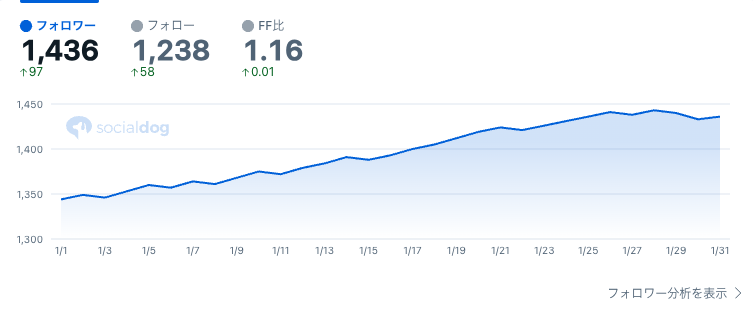
You can view the historical data of "Follower Count," "Following Count," and "Follower/Following Ratio" on the dashboard in graph format.

スクリーンショット 2024-06-12 16.52.40-1

Posting Feature

The following posting-related features are now available:

  • Post up to 5 times per month from SocialDog.
  • Set up to 10 scheduled posts across X (Twitter), Instagram, and Facebook combined.
  • View your posting history from SocialDog.

![freetry-btn-3](https://web.social-dog.net/register?/&utm_campaign=free_hp_socialdog_help_page)

Background for Resuming X (Twitter) Features on the Free Plan

SocialDog aims to "create a world where everyone can leverage social media."

The monetization of the X (Twitter) API in spring 2023 made it challenging to provide X (Twitter) features on the Free Plan. However, we hold a strong conviction to support all individuals who wish to utilize social media, including individual creators and marketers.

Therefore, we have resumed offering X (Twitter) features on the Free Plan, with the goal of enabling users to leverage social media through SocialDog as much as possible for free.

Moving forward, we will continue to add new features and improve existing ones to further contribute to your social media marketing efforts.

We hope that the reintroduction of the Free Plan will be another step towards supporting individual creators and organizations. We look forward to your continued support.

Announcement: Lite Plan (Free Plan) Feature Restrictions Due to Twitter API Monetization

無料プラン(Freeプラン)でX(Twitter)の機能提供を一部再開しました。詳細は、無料プランがX(Twitter)に対応しましたをご確認ください。

有料プランの機能制限については、こちらのお知らせをご確認ください(2023/5/19 追加)。

Liteプラン(無料)での予約投稿機能の提供を終了させていただくこととなりました。これにより、ご利用のお客様には追加の機能制限が発生いたします。お手数おかけいたしますが、今一度ご確認ください(2023/5/30 追加)。

Thank you for always using SocialDog.

We are announcing a significant restriction of features available on SocialDog's Lite plan (Free plan) due to the monetization of the Twitter API. We sincerely apologize for this sudden announcement to all our users.

At SocialDog, guided by our product mission to 'create a world where everyone can be a protagonist,' we have always provided numerous features to Lite plan users. However, the post-monetization Twitter API usage fees are extremely high, making it difficult to continue offering the same level of features to Lite plan users. Therefore, despite this difficult decision, we have decided to significantly restrict the features of the Lite plan.

Thank you for utilizing SocialDog's follower management features, keyword monitoring, and more.

For users who wish to continue using the features that are being discontinued on the Lite plan, please consider upgrading to a paid plan.

Changes

The features available on the Lite plan will be modified as follows:

| Feature | Change |

| :---------------------------------- | :----------------------------------------------------------------------------------------------------------------------------------------------------------------------------- |

| Scheduled Posts (Updated on May 30, 2023) | Discontinued
Already scheduled posts will result in a posting error and will not be published. |

| @Tweet Monitoring (Inbox) | Discontinued |

| Keyword Monitoring | Discontinued |

| Post History | Discontinued |

| RSS Auto-Posting | Discontinued |

| Follower Management | Discontinued |

Effective Date

May 16, 2023 (Changes will be implemented sequentially)

Q&A

Q. What is the Twitter API?

A. The Twitter API is a mechanism that allows external services to access Twitter data. Its monetization was announced by Twitter Inc. in March 2023.

Q. What happens to posts that have already been scheduled? (Updated on May 30, 2023)

A. Scheduled posts set to be published on or after June 1, 2023, will be displayed as posting errors. We kindly request that you either utilize a paid plan or manually post them using the official Twitter app or similar platforms.

Q. Will SocialDog no longer be available for free?

A. Features that are not being discontinued this time will continue to be available for free.

Q. Are there any changes to the paid plan features? (Updated on May 19, 2023)

A. For information regarding paid plan feature restrictions, please refer to this announcement.

We sincerely apologize for this change, which significantly impacts our users. We also deeply regret the suddenness of this announcement.

SocialDog is committed to continuous development to provide services that satisfy all our users. We appreciate your continued patronage.

Regarding the issue where X (Twitter) accounts cannot be linked

Thank you for always using SocialDog, your X (formerly Twitter) account management tool.

Currently, due to an issue on the X (formerly Twitter) side, users who are logged into X (formerly Twitter) are encountering a problem where they cannot properly set up or add an SNS profile when attempting to do so in SocialDog.

If your X (formerly Twitter) account is suspended, linking is not possible. Please attempt to link after your account has been unsuspended.

If you are unable to link your X (formerly Twitter) account and see the message "This SNS account is linked to another team," please refer to Unable to link X (formerly Twitter) account with 'This SNS account is linked to another team' message.

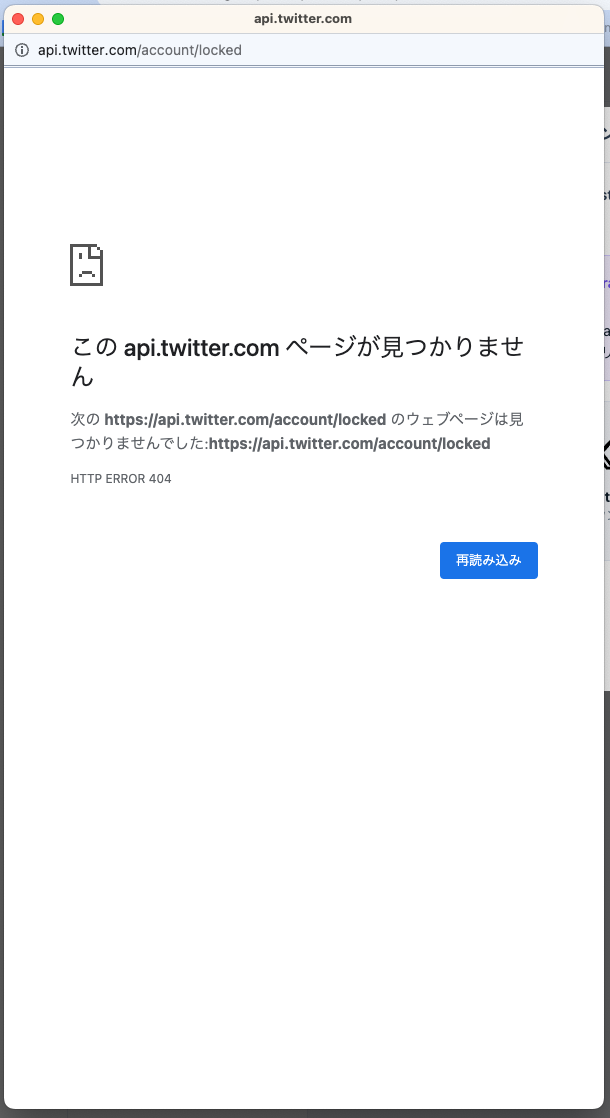
If the following screen appears with the message "This api.twitter.com page cannot be found," a one-hour lock will be imposed, during which SNS account linking is not possible. Please attempt to link your account again after one hour.

  • Cause: When entering your email address and password on the X (formerly Twitter) authentication screen, repeated authentication failures due to mismatched credentials will result in a lock imposed by X (formerly Twitter).

Therefore, please try the following steps:

  1. Open your browser's Incognito Mode. The method for using Incognito Mode varies by browser. Please check your browser's help documentation for details.
  2. Log in to your desired X (formerly Twitter) account on the official X website.
  3. Log in to SocialDog, and click Add SNS Account. The X (formerly Twitter) authentication screen will then appear.
  4. Click "Authorize app."
  5. Close Incognito Mode, then reopen SocialDog and reload the page.

Note: If you are unable to link using the above steps with your current browser, please try the same steps with a different browser.

If the issue is not resolved by following the steps above, please contact us via the contact form with the following information, and we will investigate:

  • Name of the SNS account you attempted to link
  • Screenshots or videos of the screen displayed after clicking the link button and logging in
  • Browser used to attempt SNS account linking
  • Version of the browser used to attempt SNS account linking

The method for checking your browser version varies by browser. Please check your browser's help documentation for details.

New Plan Launch Announcement (November 2023)

Thank you for always using SocialDog.

We are pleased to announce that SocialDog will be releasing new pricing plans on Monday, November 27, 2023.

To further enhance our product's contribution to your social media marketing efforts, and in consideration of the monetization of the X (formerly Twitter) API and support for social media platforms other than X (formerly Twitter), we have decided to release new pricing plans.

The new pricing plans will make it easier to centrally manage not only X (formerly Twitter) accounts but also Instagram accounts and Facebook Pages within SocialDog.

Hereafter, the pricing plans currently offered will be referred to as "Old Plans," and the new pricing plans as "New Plans."

  • The New Plans are scheduled for release on November 27, 2023. After the New Plan release, all new paid plan subscriptions or plan changes will be to the New Plans.
  • For customers currently on Old Plans, a migration to the New Plans will commence from your billing date in late January 2024 or later. Detailed information regarding the New Plan migration will be sent via email by mid-December.
  • If you are currently on an Old Plan with monthly billing, changing to annual billing by November 26, 2023, will allow you to continue using the Old Plan pricing for one year after the change to annual billing.

For the background behind the release of the new pricing plans, please refer to "Background on New Plan Announcement" below.

About the New Plans

Four Paid Plans to Choose From

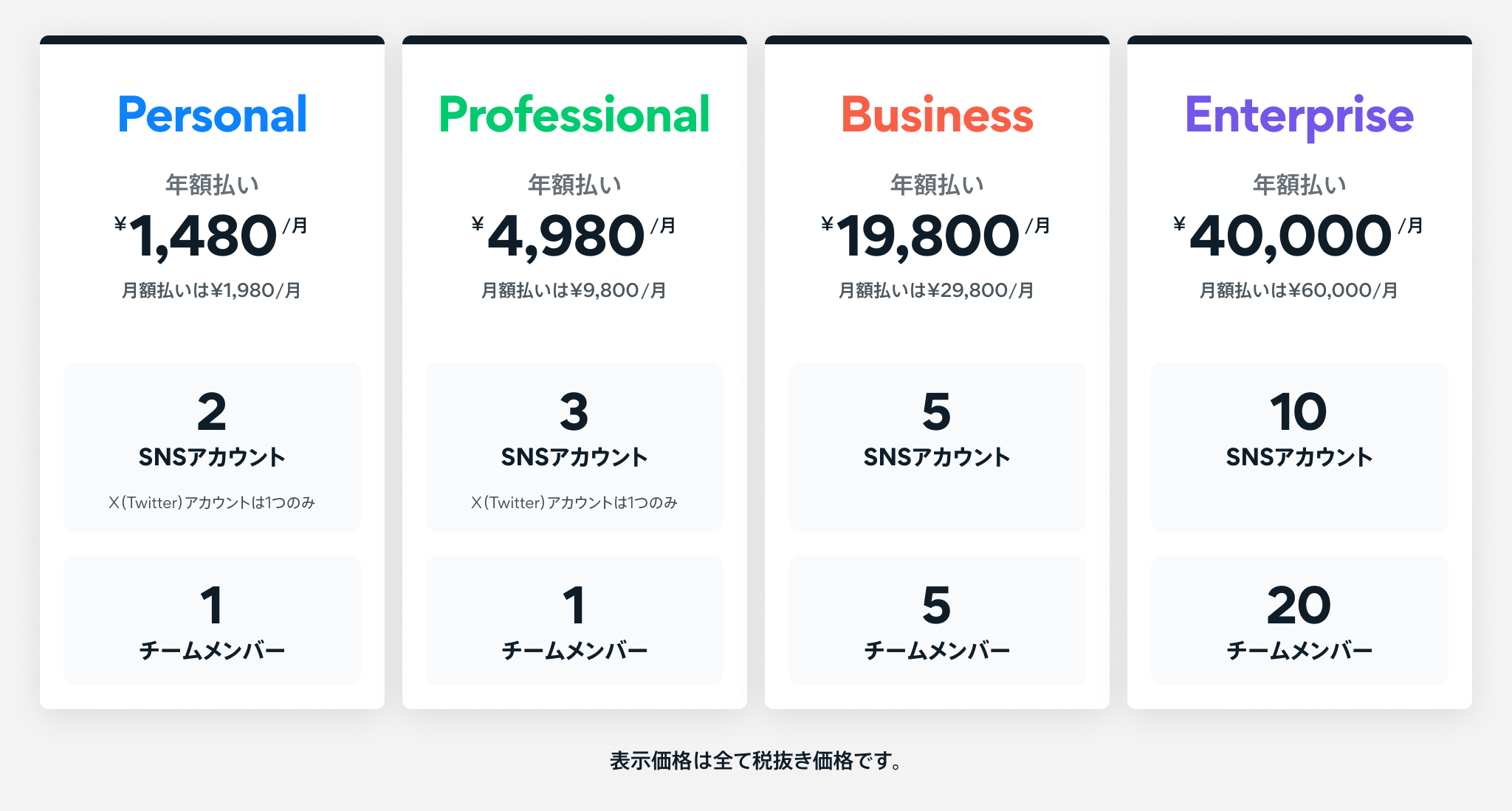
Starting November 27, 2023, SocialDog will offer four paid plans: Personal, Professional, Business, and Enterprise Plans.

Pricing for Personal, Professional, Business, and Enterprise Plans.

Pricing Structure for Easier Centralized Management of Multiple Social Media Accounts

With the New Plans, the maximum number of connectable social media accounts will be set per plan.

This makes it easier to centrally manage multiple social media accounts on SocialDog.

With Old Plans, linking two social media accounts incurred charges for two accounts. New Plans will allow you to link multiple social media accounts without additional charges.

We encourage you to take this opportunity to link and utilize multiple social media accounts with SocialDog.

Only one X (formerly Twitter) account can be linked with Personal and Professional Plans.

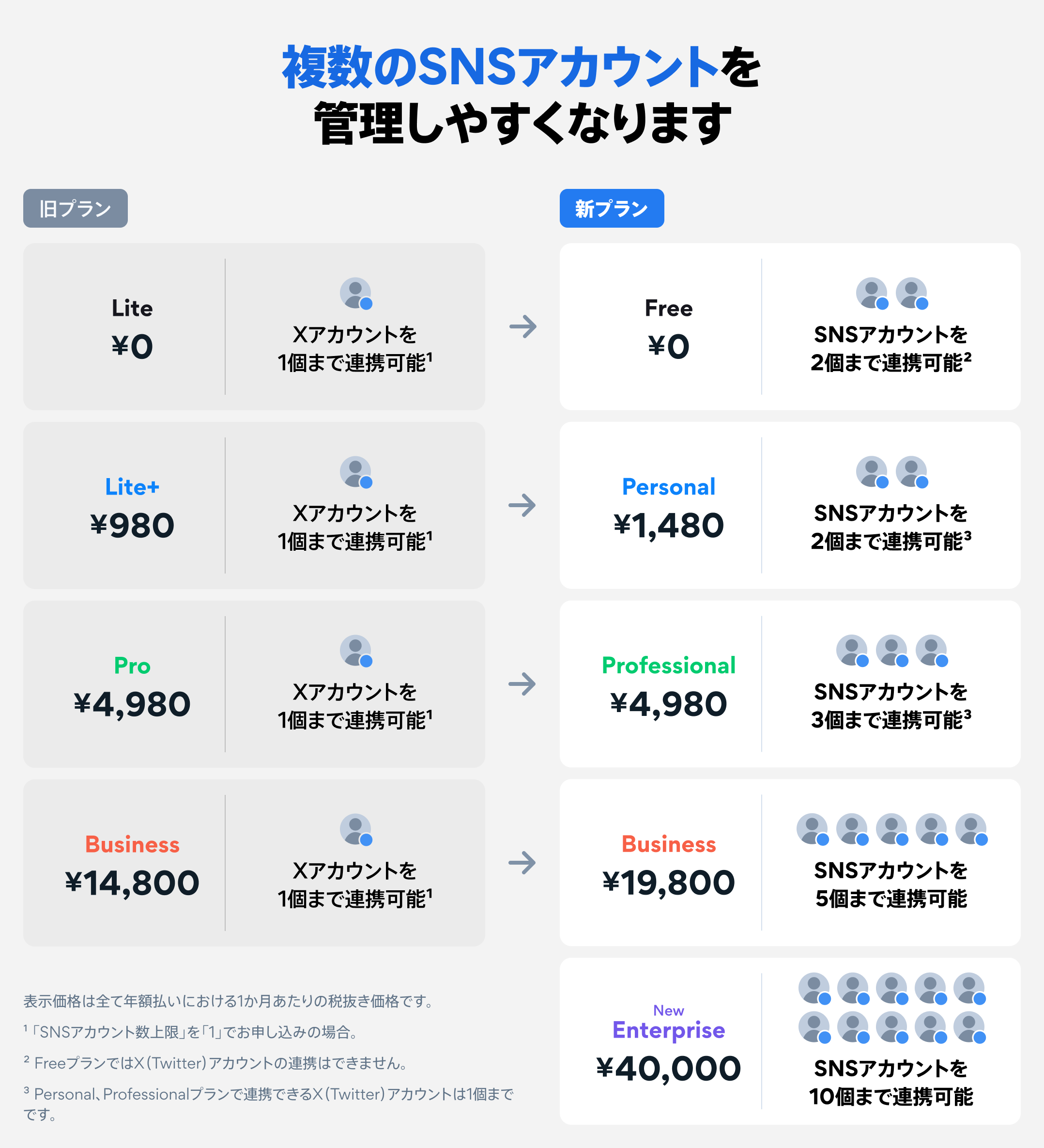
Easier management of multiple social media accounts. Comparison table of Old Plan vs. New Plan pricing and connectable social media account limits.

New Free Plan for Instagram and Facebook Operations

A new Free Plan will be introduced for easy operation of Instagram Business Accounts and Facebook Pages.

You can link up to two Instagram Business Accounts and Facebook Pages combined. You can create up to 10 scheduled posts, and for Instagram Business Accounts, analyze follower counts and post engagement for the past two weeks.

If you wish to link X (formerly Twitter) accounts or view analytics data older than two weeks, please subscribe to a paid plan.

Other Changes

  • Instagram Business Accounts and Facebook Pages, similar to X (formerly Twitter) accounts, will be counted towards the total number of social media accounts linked to your team. Available Instagram and Facebook related features vary by plan.
  • The New Personal Plan will have a scheduled post limit of "30," which will be the total limit for scheduled posts and drafts across all social media accounts linked to your team.
  • The New Business Plan will allow you to use "Post Engagement," similar to the Old Business Plan. However, the New Business Plan will only retrieve data for users who have reposted (retweeted).
  • If you wish to retrieve data for users who have liked, replied, or quote posted (quote tweeted), please subscribe to the New Enterprise Plan.

Other changes also apply. For details, please refer to "Full Feature List."

[Important] Transition Schedule to New Plans

The transition to New Plans will follow the schedule below.

  • November 27, 2023: New subscriptions to Old Plans will cease, and New Plans will become available for subscription. Additionally, Instagram and Facebook related features will be officially released and available only with New Plans.
    • After this date, all new paid plan subscriptions or plan changes will be to the New Plans.
    • If you wish to continue using Instagram and Facebook related features, please subscribe to a New Plan.
    • Customers on the Lite Plan (Free Plan) will be migrated to the New Free Plan on November 27.
  • ~Mid-December 2023: We will send an email with details regarding the automatic migration to New Plans for customers on Old Plans.
    • You will be notified one month prior to the start of the automatic migration.
  • Billing date in late January 2024 or later: You will be automatically migrated from your Old Plan to a New Plan.
    • You can continue to use the features of your Old Plan until your billing date in late January 2024 or later. The timing of your New Plan migration will depend on your paid plan's billing date. Details regarding the automatic migration to New Plans will be sent via email by mid-December.

The destination plan will generally be Personal Plan for Lite+ Plan (including Old Pro Plan (2016) and Old Pro Plan (2017)), Professional Plan for Pro Plan, and Business Plan for Business Plan. However, this may vary depending on the social media account limits or other factors. Details will be communicated via email by mid-December.

Background on New Plan Announcement

SocialDog is now entering a new stage.

We have aimed to evolve SocialDog into an "all-in-one platform for social media management" by expanding its support beyond X (formerly Twitter) to other social media platforms.

Since its founding in 2016, SocialDog has been provided as a dedicated service for X (formerly Twitter). In line with this policy, we added support for Instagram and Facebook in September 2023.

Furthermore, in the spring of 2023, the X (formerly Twitter) API was monetized. The X (formerly Twitter) API is a mechanism that allows external services to securely retrieve and operate X (formerly Twitter) posts and account information. By leveraging the API, we have provided over 1 million customers with essential features for X (formerly Twitter) marketing at reasonable prices. However, with the increase in X (formerly Twitter) API usage fees, it has become challenging to continue offering services at current prices.

Given these circumstances, we regret to announce the New Plans.

The New Plans will feature a pricing structure that facilitates easier centralized management of multiple social media accounts on SocialDog. Moving forward, we will continue to add new features and improve existing ones to further assist your social media marketing efforts.

We express our sincere gratitude to all customers who have used SocialDog thus far.

We will strive to make the transition to the New Plans as smooth as possible, minimizing any impact.

Should you have any questions or concerns, please do not hesitate to contact our Customer Success team via the SocialDog Contact Form.

We appreciate your continued patronage of SocialDog.

Full Feature List
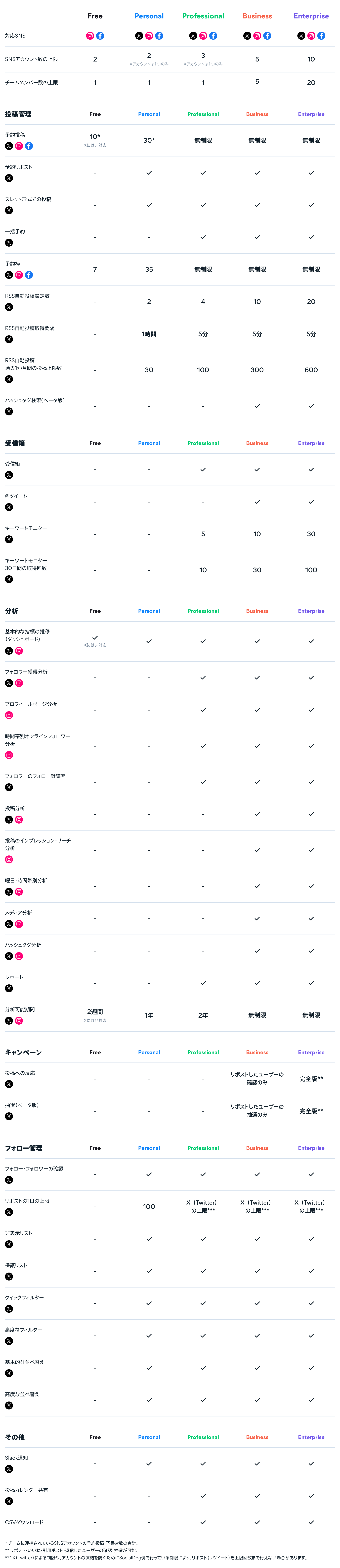
Full Feature List for New Plans

The Keyword Monitor has been updated.

Thank you for always using SocialDog.

Today, we have resumed the provision of the Keyword Monitor. We sincerely apologize for any inconvenience this may have caused.

The new Keyword Monitor allows you to retrieve tweets matching your keywords from the past 30 days (excluding protected tweets).

  • Tweets are not retrieved automatically. You need to perform the operation when you wish to retrieve them.
  • The CSV file delivery service for Keyword Monitor will be discontinued. You can now download CSV files directly from the SocialDog interface.

Features

Search from tweets within the past 30 days

The new Keyword Monitor allows you to search from tweets within the past 30 days (excluding protected tweets). Previously, only tweets posted after the Keyword Monitor was configured could be retrieved.

Ability to retrieve more tweets

The Business Plan allows you to retrieve up to 15,000 tweets per month. This can be utilized for managing campaigns that require users to tweet with specific hashtags.

Important: How to retrieve tweets

With the new Keyword Monitor, tweets must be retrieved manually.

Retrieve Latest Tweets button on the Keyword Monitor screen

You can retrieve tweets by clicking "Retrieve Latest Tweets" on the page for the target Keyword Monitor in your "Inbox". You can select the number of tweets to retrieve in increments of 500.

  • You can retrieve tweets within the limit of retrieval counts (described later).
  • The feature for notifying new keywords via Slack, email, and push notifications has been discontinued.
  • You cannot retrieve tweets older than those already acquired. If you wish to retrieve even older tweets, you can do so by adding a new Keyword Monitor setting.

Retrieval Count Limits

The number of times tweets can be retrieved varies by plan.

  • Available retrieval counts within the most recent month (Note 1)

    • Business Plan: 30 times × Number of social media profiles
    • Pro Plan: 10 times × Number of social media profiles

Note 1: Regarding "the most recent month"

Please note that this does not refer to the period from the beginning to the end of a calendar month.

Example: If the current date and time is "2023/6/15 15:00", the remaining retrieval counts at that point are calculated based on the retrieval count from "2023/5/16 15:00" to "2023/6/15 15:00".

Note 2: How retrieval counts are calculated

The number of tweets that can be retrieved per retrieval operation is 500, and you can increase or decrease the number of tweets to be retrieved in increments of 500. (With the Business Plan, you can retrieve up to 15,000 tweets by consuming 30 retrieval counts).

Furthermore, the number of retrieval counts consumed will be determined by the actual number of tweets retrieved.

Example: If you set "Number of tweets to retrieve" to 1,500 tweets, and the actual search result is 700 tweets, the number of retrieval counts consumed will be 2.

Future of Keyword Monitor

We plan to improve the Keyword Monitor to allow for automatic tweet retrieval in the future. Additionally, we aim to display tweets matching keywords in real-time.


SocialDog Inc. has concluded a contract with Twitter for the use of Twitter Enterprise API, a paid Twitter API. The Keyword Monitor, which has resumed its provision, was developed using the Full Archive Search API, a feature of the Twitter Enterprise API. We will continue to leverage the full capabilities of Twitter Enterprise API to provide features that meet your satisfaction and are committed to ongoing development.

We appreciate your continued support.

Notice of Feature Limitations for Paid Plans Following Twitter API Monetization

Please refer to the previous announcement for details regarding the feature limitations of the Lite plan (free plan).

We regret to inform you that some of the feature limitations for paid plans have been modified from our initial announcement. This will result in additional feature limitations for our users. We kindly ask for your understanding and request that you review these changes once again (Added on 2023/5/30).

The Follower Management and Follower Analytics features have been resumed. (Added on 2023/6/8).

Thank you for always using SocialDog.

We would like to announce that, due to the monetization of the Twitter API, we have decided to restrict some of the features available in SocialDog's paid plans.

We sincerely apologize for this sudden announcement to all our users.

As the cost of using the Twitter API after its monetization is extremely high, we decided to significantly restrict the features of the Lite plan (free plan) from May 16, 2023. However, upon careful review of SocialDog's Twitter API usage, it became clear that restricting features only for the Lite plan would make it difficult to stay within the Twitter API usage limits. Therefore, we regret to inform you that we have also decided to restrict some features for paid plans.

Moving forward, to meet your expectations, we will leverage the Enterprise API, which will become newly available due to the Twitter API monetization, to provide even more sophisticated and stable services than before. The Keyword Monitor, which will undergo significant restrictions this time, is planned to be revamped into a system utilizing the Enterprise API, offering features such as real-time post acquisition and notification, as well as the ability to search posts from the past 30 days.

We apologize for any inconvenience this may cause and appreciate your understanding.

Changes

The features available in paid plans will be changed as follows:

| Feature | Business Plan | Pro Plan | Lite+ (formerly Basic) Plan (including former Pro Plan (2016) and Pro Plan (2017)) |

| :-------------------------------------------------------------------- | :--------------------------------------------------------------------------------------------------------------- | :----------------------------------------------------------------------------------------------------------- | :--------------------------------------------------------------------------------- |

| Data Acquisition*1 | Once per day | Once per day | Once per day |

| Checking @Tweets (Inbox)(Updated on 2023/5/30) | Available (no change) | Discontinued | Discontinued |

| Keyword Monitor**(Updated on 2023/5/30)** | Temporarily Suspended (from approximately June 1, 2023. Details regarding the suspension period are provided below) | Temporarily Suspended (from approximately June 1, 2023. Details regarding the suspension period are provided below) | Discontinued |

| Display of Sent Follow Requests*2 | Discontinued | Discontinued | Discontinued |

| RSS Auto-Posting Monthly Post Limit (for the past 1 month)*3**(Updated on 2023/6/8)** | 300 | 100 | 30 |

| Checking Tweets Posted Outside SocialDog (Post History)(Updated on 2023/5/30) | No change | Discontinued | Discontinued |

| Follower Management**(Updated on 2023/6/8)** | Resumed | Resumed | Resumed |

| Liking Tweets**(Updated on 2023/6/8)** | Discontinued | Discontinued | Discontinued |

  • *1 "Data Acquisition" includes retrieving post history, follows/followers, and @tweets. This includes data acquisition from Twitter performed automatically on the server, as well as the manual data acquisition function accessible via the arrow button (Get latest data from Twitter) in the upper-left corner of the SocialDog screen.
  • *2 "Display of Sent Follow Requests" is a feature within the Follower Management function that indicates whether a follow request has been sent to a private account. Sending follow requests will continue to be possible.
  • *3 "RSS Auto-Posting Monthly Post Limit" refers to the maximum number of tweets that can be posted via RSS auto-posting within the most recent month (Updated on 2023/6/8). This is a newly added restriction. If the "RSS Auto-Posting Monthly Post Limit" is reached, any tweets exceeding the limit will not be posted.

Effective Date

May 22, 2023 (Changes will be gradually implemented)

* Changes to the "Checking @Tweets" function, "Keyword Monitor," and "Checking Tweets Posted Outside SocialDog (Post History)" function are scheduled for June 1, 2023.

Regarding Temporarily Suspended Features (Updated on 2023/6/13)

Keyword Monitor

Due to contractual issues with the Twitter API, the provision of the Keyword Monitor will be temporarily suspended. However, the Keyword Monitor will be rebuilt utilizing the Enterprise API (Full Archive Search), which is the paid version of the Twitter API, and will be released soon.

Q&A

Q. What is the Twitter API?

A. The Twitter API is a mechanism that allows external services to utilize Twitter data. Its monetization was announced by Twitter Inc. in March 2023.

Q. What happens if I have already set up RSS auto-posting?

A. Previously configured RSS auto-posts will continue to operate.

However, if the number of tweets posted via RSS auto-posting in a month exceeds the "RSS Auto-Posting Monthly Post Limit," the RSS auto-posting function will cease operation.


We sincerely apologize for any significant inconvenience caused to our users due to these changes in our services. We also deeply regret any trouble caused by the sudden nature of these changes.

SocialDog will continue to strive daily for development to provide services that satisfy all our users.

We appreciate your continued patronage.